Tag Archives: Apple

Three Years of Problems with My iMac G5

I’ve been a fan of Apple’s computers every since I started on them in my design classes back in 1997. Around 2000 I bought my first Mac, a Power Mac G4 with a 17″ Graphite monitor and fell in love. This machine treated me well for about 5 years until I finally gave it away to my younger brother. Through the years I added extra hard drives, increased the memory, swapped in a Superdrive, and updated from OS 9.0 to Tiger with every major OS X update in between.

Sometime around 2004 I decided I needed more horsepower to do some video editing. I couldn’t afford a Power Mac G5 so I focused on the iMac product line. I can remember holding out for months waiting for Apple to update from the lamp-shade form factor to the new slim and white design. And then waiting a few more months until they updated these new iMac’s once again, knowing Apple traditionally has all kinds of hardware issues with a new form factor. I really wanted to make sure I got a computer that would last me as long as the G4 did.

In February of ‘05 I finally decided it was time. Went to the Apple Store at the Walden Galleria Mall and looked around. Back in 2005 Apple wasn’t putting Bluetooth modules in the iMac’s as standard option, so I had to pay extra for that. I really hate having a wireless keyboard and mouse since they eat batteries, but I wanted the option of Bluetooth in case I needed to wireless sync my Palm Treo with it. I also had them double the RAM which was stupid since everyone knows it’s more expensive buying memory from Apple. Oh well.

For the next 6 months my new iMac worked fine. The 4th of July was right around the corner and I was super pumped for a nice long holiday weekend. When I went to use my computer that weekend the screen was blank and it was turned off. Weird. I turned it on and the white pulsating light in the right corner flashed and I heard the startup chime. Then the machine died. Ugh.

Tried the obvious stuff like unplugging everything, resetting the PRAM, and rebooting. Nothing worked. Called Apple Care and they had me open it up and check some LED diagnostic lights to see what was up. Ever try to unscrew and open a computer while on the phone with some dude walking you through it? Yeah it sucked. After trying everything the customer service rep suggested he told me to take it to the Apple Store for a look.

Blah. Had to carry this heavy 20″ iMac through half of the mall to get to the store and have an Apple Genius play with it. He determined it was dead and I had to send it away for repairs. Everything would be covered since it was still under warranty and I had Apple Care. But it would take about a week to repair because of the holiday.

When I got it back everything was fine again. I was worried my hard drive would have been wiped but all my data was in check. Turned out they had to replace the display bezel, power supply, and a bunch of other innards. The parts cost close to what I paid for the computer, so they probably replaced everything to be safe.

Flash-forward two years later to my 28th birthday. Go to use my computer on my day off and guess what? Blank screen and it’s turned off. Great. After some troubleshooting I decide to take it back to the Apple Store to have a Genius look at it. No way I was sitting on hold for 2 hours again with Apple Care Support.

It was the middle of the day so no one was in the store except for a few goons who had problems with their iPods and were trying to scam new ones. The Apple Genius looks at my machine and says it’s the logic board and power supply. “Umm I just had those both replaced.” Well whatever, Apple Care was covering it and they could do the repair in store this time so I wasn’t too annoyed. Came back an hour later with a new logic board, power supply, and something called an ambient light sensor installed in my iMac. I guess when they replaced my logic board the first time it was with another bad one and before a recall on that part. Everything should be fine with it now going forward….yeah right!

Yesterday I woke up for work and went to check my email. Walked into my office and noticed my iMac was pretty loud because the fans were going strong. “Uh oh…that funny pixelated pattern flashing on my screen doesn’t look good.” I didn’t panic yet since I thought maybe it was software related and just needed a fresh restart. Force rebooted my machine and the gray Apple logo came up fine.

Then the funny pixels and static showed up again. Tried to run the diagnostic disc that came with Apple Care to see what was wrong, but that wouldn’t work either. Everything seemed to be functioning fine except for the display. Made an appointment with a Genius later in the day and hoped that I’d be eligible for the iMac G5 Power & Video Repair Extension Program since my Apple Care Warranty ran out in February.

Got to the Apple Store early after carrying my iMac through the Galleria Mall for the 3rd time! The Genius Bar was an absolute mess with all these people waiting to have their precious iPhone’s and iPod’s looked at because they did something stupid and broke them. One Genius in particular seemed extremely knowledgeable. All the other Genius’ were asking him questions and for help, so I was pumped when he was going to look at my broken iMac.

Fired up the iMac and he knew right away what the problem was. “You need a new logic board.” Come on are you kidding me? How many times can this stupid part go bad? The worst part was this would cost me around $700 to repair since my machine wasn’t under warranty. He wasn’t even interested in the fact that they’ve replaced the same part twice before. The machine obviously has some major flaw if the same thing keeps breaking.

I refuse to pay $700 to have something replaced that would probably break again. After thinking it over I decided to buy a new iMac 20″ Intel Core 2 Duo and pray it doesn’t have any issues. As much as I love Apple products they really need to figure out these quality control issues. Everyone I know has had a major hardware issue with their Apple products. I guess the days of getting 5+ years out of a Macintosh are long gone. =(

The only thing I’m worried about now is transferring all my data and applications to the new machine. I’ve been running Time Machine to backup everything so it should be a non-issue. But we’ll see just how painless Apple has made this. Since my old machine still turns on I’m going to try and put it in Fireware target mode and see if I can move everything over first. We’ll see…

Upgraded My iMac G5 To Leopard. Finally!

Leopard Migration Assistant almost done

I did my research this time around and checked out various websites and forums to see if all the major applications I use daily would be supported in Mac OS X Leopard. A lot of the Adobe crap, QuarkXpress, and 3rd party software I use for syncing my Palm Centro were up in the air in terms of Leopard compatibility. Came to the decision last Friday that I would just purchase a 500GB external hard drive, clone my startup disk to it, and if problems arose in Leopard I would just downgrade back to Tiger.

Backing up to the external drive took a few hours to move about 90GBs of data and then I was ready to pop in my Leopard DVD and start the clean install process. Figured it was a good idea to start fresh since my iMac was upgraded from Panther to Tiger and now Leopard…who knows how much crap and clutter was lurking around in the system preferences ready to slow things down and cause problems.

A hour later Mac OS X Leopard booted up for the first time and I ran the Migration Assistant to move over all my user data, network settings, and applications from my external drive. This process took awhile but seemed to do a good job because my wallpaper, user pic, settings, startup items, and applications came over just how they were prior to the clean install. Sweet!

Next came firing up Adobe Creative Suite 1 applications to see if they’d launch and function properly. Photoshop…check, Illustrator…check, InDesign…check. I didn’t really poke around to much but all of those applications launched, opened documents, saved documents, printed, and seemed to function fine. I guess InDesign is the most buggy of the bunch but I rarely use it so I’m sure I’ll be fine.

QuarkXpress 6.1 and 6.5 opened fine for me as well. There were a few buggy things with the cursor, but nothing that would cause me any headaches. Certainly wasn’t as bad as trying to run QuarkXpress 4 in classic mode…yuk! I’ve read of some bugs with Saving pages as EPS files, but that seemed fine to me, as did exporting PDF files. I didn’t try to save a PS file and run it through Distiller but I don’t see why that would give me any problems. The real test will be doing some serious work in QuarkXpress and Photoshop, but I rarely do that at home. So I should be fine for now.

The only other application I was worried about was MarkSpace’s Missing Sync for Palm OS. MS has stated on their website that version 6 has issues with Leopard and they were working on fixing them. Seeing how I have an older version (5.1) I pretty much expected things not to work. Didn’t really care if my data sync’ed up in iCal or Address Book properly yet. I just wanted my data on my Palm Centro to stay put and be backed up somewhere on my computer just in case I had to hard reset it. To my surprise everything appeared to sync with the desktop (didn’t push changes to iSync and brought up a conflict manager which was expected). MS posted version 6.0.2 b1 of Missing Sync for Palm OS to their website which claims to works with Leopard now. I’ll give that a try later today when I take the plunge and pay to upgrade from version 5 to 6.

So for now I’m a happy camper as far as Leopard is concerned. Formatted my external drive after everything was up and running, and now have Time Machine backing up to it. Coverflow in the finder runs pretty good on my aging iMac G5, iChat looks nice (even though the video chat effects are disabled due to it not being an Intel), and the download stack is a welcomed addition. Sure there are a lot of other features and cool things going on in Leopard but these are the ones that have impacted me the most so far. I’m curious to see how the Finder performs over shared drives…could be a life safer at work if it’s speedier than Panther or Tiger.

iPod classic Software Update 1.0.2

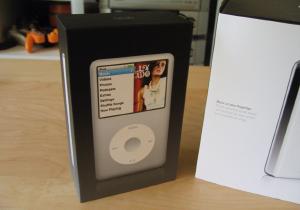
iPod classic About PageForgot to write about this the other day, but after updating my iPod classic with the new 1.0.2. software I’ve seen some performance gains. For starters browsing through the menus is greatly improved. In the past, hitting the menu button meant I would wait 2-3 seconds while it did nothing and gave no sense of feedback that I actually pressed the button before bringing up the menu screen. I think it had something to do with the iPod fetching artwork to fade through on the right, but whatever it’s doing now seems to have fixed that.

I never use Cover Flow to browse my albums so I’m not really sure if that’s faster or not. It seemed fast enough prior to the update so who cares.

The one thing I haven’t seen a fix for or a setting to toggle on/off, is that dumb clock and battery gauge that shows up after the backlight goes to sleep. I hate that! You can get around it if you set the backlight to never go off, but I don’t exactly want to drain my battery faster.

One Week With the New iPod classic

Last week Apple finally unveiled the new generation of iPod’s. The last iPod I purchased was a 3rd generation model with 40GB of hard drive space and have been waiting for a decent successor. My iTunes Music Library has finally outgrown the 3rd gen so I decided this was the time to get a replacement. I figured an iPod that resembled the iPhone would be just around the corner and pleasantly surprised when the iPod touch was announced.

At 16GB the iPod touch couldn’t meet my needs, so I decided to go with the new iPod classic 80GB model which should hold me over for the next 2 years. Hopefully by then flash drives sky rocket in capacity and I can get a version of the iPod touch with 100GB+. Until then the classic more than meets what I was looking for and—a music player that can hold all my tunes and have enough juice for a full work day.

The classic has it’s problems but nothing that is giving me buyer’s remorse. The following are some reasons I adore my new purchase and then a few areas it needs improving on.

The pros:

  • Battery life!!! I played 3 hours of video (with backlight on) and 4 hours of audio and the battery meter barely moved. With a promised 30 hours of audio / 7 hours of video playback I’m extremely happy with this little guys performance. Sure beats the 20 minutes I’d get on a full charge with my 3rd gen…
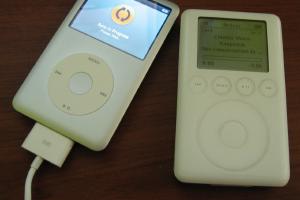
  • Nice and thin. About half the size of my old iPod
  • All metal enclosure. Feels solid and well built.
  • New interface. Spliting the menu in half and showing album art and photos fade by looks great. There was so much dead space with the 5th generation iPod’s interface that this is a step in the right direction.

The cons:

  • The interface. Sure it has eye candy like cover flow and the new menu design, but it’s way to sluggish. When you move from music to photos to videos to settings, the menu just chugs along and you have to wait while it pre-fetches artwork. It’s not a problem once you get into playing some music but half the time I thought I didn’t press the button because you get no feedback that you actually selected something.
  • The clock. WTF?!? After 20 seconds of inactivity the Now Playing screen goes away and you get this lame clock displaying the time and battery level. The only way I’ve been able to get rid of this “feature” is by turning the backlight setting to Always On. Must be some energy saving feature Apple thought was necessary. Give me the option to turn this off please.
  • Scroll wheel sensitivity seems off. Maybe I’m used to pre-click wheel iPod’s and it’s a problem they’ve all shared, but I have problems rating songs or moving through the menus accurately.
  • Screen glare. When used in my car during the day I can barely see the screen. Not that big of a deal, but I’m glad I didn’t get an iPod touch for this very reason. Would have nearly impossible to navigate through songs since it has no hard buttons and I wouldn’t be able to see the screen.

iPod classic syncingiPod classic thickness compared to 3rd gen iPodiPod classic interfaceiPod classic games menuiPod classic coverflowiPod classic coverflow - album track listingiPod classic browsing photosiPod classic search

Decisions, Decisions, Decisions

I was overcome with excitement as I read Engadget’s live blogging of Steve Job’s Keynote at the “Beat Goes On” Special Event held Yesterday. Finally Apple was releasing an iPod that had everything I had been waiting for–touch screen, beautiful widescreen display, built in wifi, amazing web browsing, and decent battery life. Then reality kicked in when I immediately thought to myself “how is something this thin going to have more than 40GB’s of disk space?” My dream had been killed when it was announced that the new iPod touch would come in two flavors–an 8GB model and a 16GB model. =(

I have been putting off purchasing a new iPod for the past two years. With every refresh I tell myself “just wait six more months…something better is coming.” That something better turned out to be an iPhone, but with it being an exclusive to AT&T I just couldn’t justify switching carriers and paying more to get all the plan features I have now. So I waited, knowing the day would come when Apple would release an iPod in the iPhone form factor, minus the phone stuff.

My first impulse was to just buy the iPod touch when it was announced. Saying the hell with having a ton of space to store all my music. The beautiful screen, the ability to browse the real internet with Safari, being able to watch YouTube videos on the go, and flipping through my music by using multi-touch seemed to outweigh the fact that it was ONLY 16GB!!!

Then I started making a list of all the things I needed in a portable music player and what I’d really use it for.

  • Has to be 60GB or great. My iTunes Music Library is around 50GB and I have 5GB of photos. If I want access to all my goodies it needs to be at least this size.
  • Battery life. My current iPod (a 3rd Generation 40GB) lasts about 4 hours with back-light and shuffle turned off. Need something to get me through a full 8 hour shift at work and then some.
  • Has to be easy to browse through my music while driving. This is where I do most of my music listening. Really don’t need to get into an accident because I was trying to change albums or rate a track.

That’s it. Those are the only features I really need! Having wifi would surely be nice, but I’m rarely in range of free public wifi to make it useful. When I am it’s at my house and could just use my iMac or Wii or something to browse the internet instead. I could care less about wirelessly downloading music from the iTunes Music Store right from my iPod or buying tracks that are playing in my local Starbucks.

iPod Classic (in black and silver)Coming to those realizations I decided to go with the re-branded iPod classic 160GB. With that amount of hard drive space I shouldn’t have any problems holding all my content for the next 4 years. It’ll be nice to have all my music, photos, and possibly videos (if I decide to start encoding movies from my DVD collection) in one small package. I’m sure it’ll be a lot safer when I drive compared to an iPod touch. I’ll be able to change tracks without looking at the screen since the classic has hardware buttons and I can feel where they are. Something impossible to do with the iPod touch. Not to mention the classic has an insane battery life…40 hours of audio 7 hours of video!!!

This weekend I’ll venture out to my local Apple Store at the Walden Galleria Mall and pick me up an iPod Classic. Stay tuned for a quick review of it chock full of nerdy unpacking pictures. The only other decision left to be made is silver or black? Decisions decisions…does it ever end?