Tag Archives: iPhone

Decisions, Decisions, Decisions

I was overcome with excitement as I read Engadget’s live blogging of Steve Job’s Keynote at the “Beat Goes On” Special Event held Yesterday. Finally Apple was releasing an iPod that had everything I had been waiting for–touch screen, beautiful widescreen display, built in wifi, amazing web browsing, and decent battery life. Then reality kicked in when I immediately thought to myself “how is something this thin going to have more than 40GB’s of disk space?” My dream had been killed when it was announced that the new iPod touch would come in two flavors–an 8GB model and a 16GB model. =(

I have been putting off purchasing a new iPod for the past two years. With every refresh I tell myself “just wait six more months…something better is coming.” That something better turned out to be an iPhone, but with it being an exclusive to AT&T I just couldn’t justify switching carriers and paying more to get all the plan features I have now. So I waited, knowing the day would come when Apple would release an iPod in the iPhone form factor, minus the phone stuff.

My first impulse was to just buy the iPod touch when it was announced. Saying the hell with having a ton of space to store all my music. The beautiful screen, the ability to browse the real internet with Safari, being able to watch YouTube videos on the go, and flipping through my music by using multi-touch seemed to outweigh the fact that it was ONLY 16GB!!!

Then I started making a list of all the things I needed in a portable music player and what I’d really use it for.

  • Has to be 60GB or great. My iTunes Music Library is around 50GB and I have 5GB of photos. If I want access to all my goodies it needs to be at least this size.
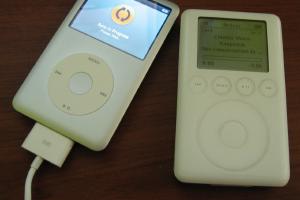
  • Battery life. My current iPod (a 3rd Generation 40GB) lasts about 4 hours with back-light and shuffle turned off. Need something to get me through a full 8 hour shift at work and then some.
  • Has to be easy to browse through my music while driving. This is where I do most of my music listening. Really don’t need to get into an accident because I was trying to change albums or rate a track.

That’s it. Those are the only features I really need! Having wifi would surely be nice, but I’m rarely in range of free public wifi to make it useful. When I am it’s at my house and could just use my iMac or Wii or something to browse the internet instead. I could care less about wirelessly downloading music from the iTunes Music Store right from my iPod or buying tracks that are playing in my local Starbucks.

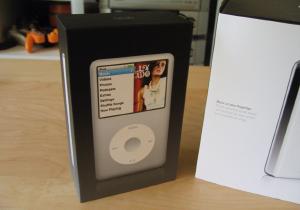
iPod Classic (in black and silver)Coming to those realizations I decided to go with the re-branded iPod classic 160GB. With that amount of hard drive space I shouldn’t have any problems holding all my content for the next 4 years. It’ll be nice to have all my music, photos, and possibly videos (if I decide to start encoding movies from my DVD collection) in one small package. I’m sure it’ll be a lot safer when I drive compared to an iPod touch. I’ll be able to change tracks without looking at the screen since the classic has hardware buttons and I can feel where they are. Something impossible to do with the iPod touch. Not to mention the classic has an insane battery life…40 hours of audio 7 hours of video!!!

This weekend I’ll venture out to my local Apple Store at the Walden Galleria Mall and pick me up an iPod Classic. Stay tuned for a quick review of it chock full of nerdy unpacking pictures. The only other decision left to be made is silver or black? Decisions decisions…does it ever end?

iPod Features & Software Enhancements I’d Like To See

Seems like all the Apple and gadget blogs are bringing up rumors about the next generation of iPods and iPod Nanos again. Rumor is they’ll be sporting some sort of Mac OS X type interface that may ore may not have touch capabilities. Might not quite be the iPod flavored iPhone that everyone wants but the bare minimum it should include coverflow and other enhancements in the UI.

These stories got me thinking of some software features I’d like to see the iPod implement in the future. I only have a 3rd Generation iPod so I haven’t been spoiled by some of the tweaks made over the years, but I think these still apply. Could really care less about playing video and viewing photos—these features will focus on the music playing aspects of the iPod only.

1. Related artists. Using social networking sites like Last.fm and iLike have really spoiled me in this realm. They harvest all kinds of data (through iTunes plugins) and because they have such a large user base they can make sense of it all. I think it has something to do with users tagging tracks and artists, but however it works I like it. Great way to discover new music! The way Last.fm recommends new artists and allows me to sample them before purchasing is great because it’s all based on what I’ve been listening too. It’s really smart and for the most part highly accurate.

When I play a track in iTunes the iLike interface shows me related bands that I’ve purchased and are in my iTunes Libary. Wouldn’t it be great if you’re listening to your iPod and a song plays and you think “man sure would like to hear more tunes like this Xiu Xiu track.” Then you tap a button or select a menu option and bam, it creates your custom Xiu Xiu related artists’ playlist based on available songs in your iTunes Library.

2. Similar to the related artists feature would be a simple way to listen to more tracks by a given artist. I don’t know how many times I’ve have my iPod on shuffle and a cool track plays. If I want to play the rest of that artists’ music I have to go back a few menus and locate them. Maybe the iPhone solved this problem (can’t remember), but would be nice to see it in next generation iPods as well.

3. Some way to rate entire albums and artists. Not just individual tracks. Not sure how you could implement this without making it overly complicated, but would be nice.

4. Tagging. Would love to be able to tag tracks and if possible pull in top tags from Last.fm for artists, albums, and tracks in my Library. Yes I’m aware that I can faux-tag my tracks by adding them in the comments field…but you can’t search that way. Sure you can create smart playlists based on criteria in your comments field, but it would be great to search by tags in addition to artist, album, and song titles. Tagging tracks would also help with the related artists feature detailed earlier.

Maybe all this is wishful thinking and really only applies to people who have large music libraries. I just love rediscovering music I haven’t listened to in months, maybe years, and improving on how you interactive with it couldn’t hurt.

The iPhone’s ‘Real Internet’ Doesn’t Matter To Me—7 WAP Sites That Do

I’ll be the first to admit, the idea of having a full on desktop browser in the palm of my hand is something to lust over. But you know what? Who cares. Sure Apple has done some really great things with Safari on the iPhone that make browsing websites on a smaller screen tolerable. I’m not into all the extra scrolling, or tapping to zoom in/out is all that necessary when you have simple WAP sites out there.

When done properly these sites allow you to get what you need quickly and easily. Sure they are abbreviated versions of their big brothers, but when I’m away from my desktop that’s all I need. The funny thing is most web apps being developed for the iPhone are nothing more than simplified versions of commonly used sites, with a cleaned up UI and fancy animations and AJAX junks. So maybe that’s were all this WAP stuff will eventually evolve into…

For now, the following are WAP enabled sites I can’t live without, especially on my lunch breaks. :-)
Oh and you don’t need a fancy smartphone to use these sites, any mobile phone with access to the Internet will do.

1. Google Reader
http://www.google.com/reader/m

Google Reader Mobile Home ScreenshotGoogle Reader Mobile Article ScreenshotI’m a RSS feed whore and Google Reader makes it so easy to keep up on all my subscriptions. The best part is if I read an article on my phone it’s marked as read and won’t show up later when I read from my iMac at home. You can do pretty much anything you’d expect to, all on your phone.

  • Read articles
  • Browse by tags
  • Browse by subscriptions
  • Star an article
  • Mark articles as unread

2. Digg
http://diggriver.com

Digg Mobile Home ScreenshotWhen you want to digg or browse top stories on your mobile phone, diggriver.com is the jam. It does have a few hang-ups though:

  • Can’t bury stories. Can only digg them.
  • Can’t view or add comments on stories.
  • Viewing the original story can get screwy since it often links to non WAP sites.

3. Wikipedia
http://wapedia.mobi/en

This has come in handy a few times when I needed to know a piece of trivia to impress my friends. Sweet! Works like it’s big brother.

4. Flickr
http://m.flickr.com

Flickr Mobile Contacts ScreenshotFlickr makes it easy to upload photos from your mobile phone and now it’s even easier to browse them from your phone. You can’t edit photo details as far as I can tell, but other than that it gets the job done well.

  • Search for photos by keyword and tags
  • Upload photos (or send by email)
  • View your contacts photos
  • View and add comments to photos

5. Vox
http://www.vox.com

Vox Mobile Home ScreenshotVox Mobile Photos ScreenshotVox is great social community for blogging that is heavily integrated with other web services. It makes sharing posts containing images, video, and music with friends and family super simple. They even have an application that you can install on your phone or Palm to make posting even easier.

  • Create posts
  • Read posts from your neighborhood or just explore the recently added
  • Search posts
  • View/add comments on posts and media
  • Organize your library of media

6. Ebay
http://wap2.bonfiremedia.com

Ebay Mobile Home ScreenshotEbay Mobile Search ScreenshotNow you don’t have to worry about being at your computer minutes before an auction ends to get in a last minute bid. Just watch an items bidding history right from your phone now! Does pretty much everything you’d need it to do.

  • View items you are bidding on, watching, selling, won, and more
  • Bid on items
  • Search for items
  • View listings with full descriptions and gallery pictures

7. Facebook
http://m.facebook.com

Facebook Mobile Profile ScreenshotFacebook Mobile Home ScreenshotWow a social networking site that actually gets it. If you’ve ever tried to open Myspace on your phone Facebook’s mobile version will be a treat. When you log in your home screen resembles one you’re used to, complete with all the things your friends have been up to. The profiles are simplified and don’t support 3rd party apps that might have been added, but all the basic information is still there.

  • View profiles
  • Send messages
  • Leave notes on friends’ walls
  • Update your status
  • View photos
  • Check events

Activate iPhone From Home, Says Steve Jobs

Just saw the activation video on Apple’s iPhone site and am really digging how easy they are making it. This along with the fairly reasonable plan prices they announced recently are really making me think twice about getting an iPhone. The 450 anytime minute plan is comparable to what I have a Sprint with my Treo now (minus the unlimited text messaging), but I’m willing to overlook that if this phone turns out to be that good.

Really the only piece of the puzzle I’m waiting on is for some sort of checkbook, Quicken, or Splash Money type application for the iPhone to show up. Sure I can load my Palm Treo with all kinds of 3rd party applications, but really I never had much use for all this stuff. If the Safari browser is truly the real internet and I can manage my calendar and checkbook with it, ‘ll be a happy camper. We’ll see what develops in the next couple of months once it’s been out in the wild for a bit. I have high hopes for this thing!

read more | digg story

My Impressions After Watching Steve Job’s Keynote

Well I thought Steve Job’s WWDC ‘07 Keynote was pretty good. Not sure why everyone is disappointed or “underwhelmed” by it. Frankly I don’t care about new hardware announcements right now… I’m more interested in what Leopard has to offer and that’s what I got. It is a developers conference after all and not a something like MacWorld where new products should be unveiled. Read More »