
Autumn refresh
Lately I’ve been toying with the idea of migrating from Jekyll to GatsbyJS (more on that in a future post). Initial tests look promising, but there are some issues I’m still working through.
In the meantime I’ve taken visual cues from React components I built in a repo where I was playing around with Gatsby, and adapted them here as standard HTML/CSS.
Design changes
In Made Mistakes v12 text and image where large and readible, but didn’t exactly fill the canvas elegantly. I wanted to change that with this design refresh.

Since majority of the visitors to my site use modern browsers, I had a good excuse to play with display: grid. I’ve removed the Susy mixins and most of the float based columns, which cut the amount of CSS I had to write considerably.

To my eye this new layout breaks up the page better. Content comes into view earlier on the page, and there’s plenty of room for ancillary information on the right. With a little position: sticky sprinkled on the aside column, internal skip links stay fixed in view — when space allows.
Accessibility improvements
This refresh prompted me to test how accessible the site is and fix any glaring issues.
Buttons have an accessible name
When a button doesn’t have an accessible name, screen readers announce it as “button”, making it unusable for users who rely on screen readers.
Digging in, I discovered bigfoot.js1 didn’t name <button> elements that it created. Thankfully the button markup is configurable so I was able replace a set of presentational-only <svg> elements with unique names instead.
var bigfoot = $.bigfoot({
  actionOriginalFN: 'delete',
  buttonMarkup: (
    '<div class="bigfoot-footnote__container">' +
    ' <button href="#" class="bigfoot-footnote__button" rel="footnote"' +
    ' id="{{SUP:data-footnote-backlink-ref}}"' +
    ' data-footnote-number="{{FOOTNOTENUM}}"' +
    ' data-footnote-identifier="{{FOOTNOTEID}}"' +
    ' alt="See Footnote {{FOOTNOTENUM}}"' +
    ' data-bigfoot-footnote="{{FOOTNOTECONTENT}}">' +
    ' <span class="visually-hidden">{{FOOTNOTENUM}}</span>' +
    ' </button>' +
    '</div>'
  )
});
Color contrast is satisfactory
The color of elements like captions and footer text were too light, so I darkened them. I did the same for links by giving them a contrast ratio of 4.77.
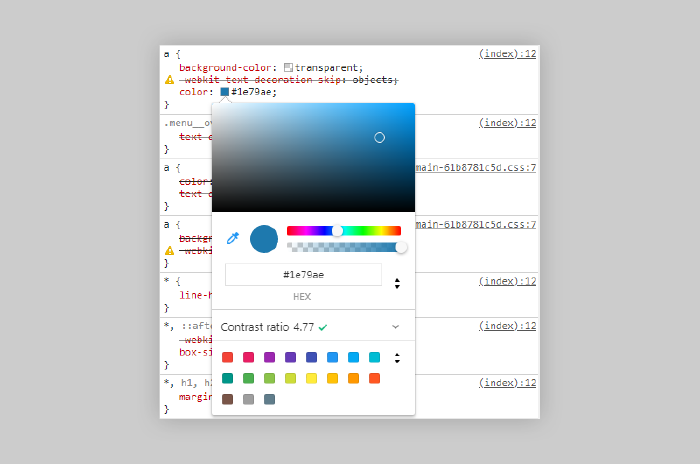
The Color Picker in Chrome’s DevTools will show you the contrast ratio of text elements to help make your site more accessible to users with low-vision impairments or color-vision deficiencies.
Performance improvements
Optimizations with the biggest impact (minifying, concatenating, inlining critical CSS) I was already doing, but there was still room for improvement.
Defer offscreen images
Consider lazy-loading offscreen and hidden images after all critical resources have finished loading to lower time to interactive.
Large feature images were already lazy-loaded and served responsively using srcset and a handful of sized images. Images found in the body {{ content }} of my Markdown files were not.
Taking a cue from gatsby-remark-images’ playbook, I wrote a small plugin to convert Markdown image syntax into an <img> element with synatactically sugar for lazy-loading. To my surprise this actually worked.
# Description: Jekyll plugin to replace Markdown image syntax with lazy-load HTML markup

Jekyll::Hooks.register :posts, :pre_render do |post, payload|
  docExt = post.extname.tr('.', '')
  # only process Markdown files
  if payload['site']['markdown_ext'].include? docExt
    newContent = post.content.gsub(/(?:!\[(.*?)\]\((.*?)\))/, '<noscript><img src="\2"></noscript><img src="data:image/gif;base64,R0lGODlhAQABAAAAACH5BAEKAAEALAAAAAABAAEAAAICTAEAOw==" data-src="\2" alt="\1" class="lazyload fade-in">')
    post.content = newContent
  end
end
Avoids an excessive DOM size
Browser engineers recommend pages contain fewer than ~1,500 DOM nodes. The sweet spot is a tree depth < 32 elements and fewer than 60 children/parent element. A large DOM can increase memory usage, cause longer style calculations, and produce costly layout reflows.
Trimming <div> fat where I could helped cut page weight down. Some hefty pages remain (I’m looking at your PaperFaces gallery, but most fall under the 1,500 DOM node threshold. In the future I hope to fix this issue with a gallery pagination component when switching to Gatsby.
Lighthouse audits comparison
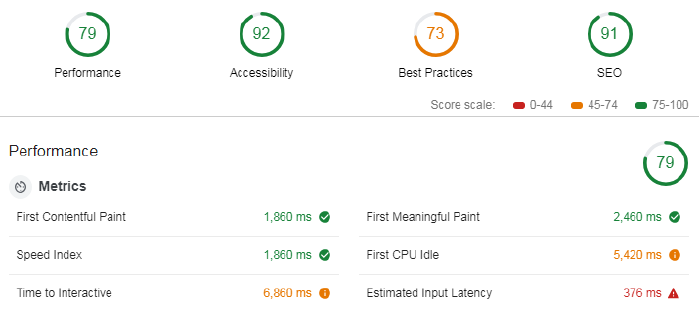
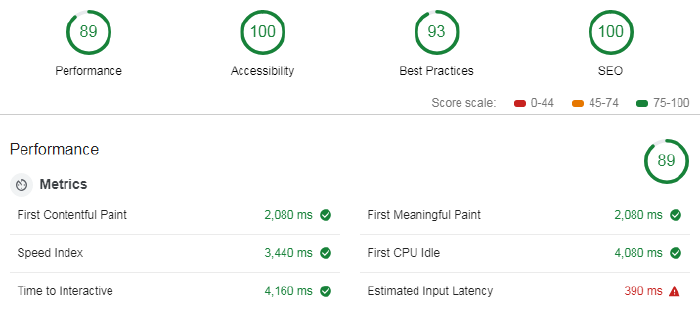
Not sure why metrics like Speed Index increased. But Time to Interactive, First Meaningful Paint, and First CPI Idle all show improvements, so I guess that’s why the site went from a 79 in performance, to an 89.
Build and deploy
And if all of this wasn’t enough, I also made the switch away from Travis CI, to Netlify. Instead of a 48 line .travis.yml file I now have a three line netlify.toml.
The Netlify builds are about 2-4 minutes faster than those with Travis CI. And look to be even quicker if I leverage undocumented Netlify cache folders that persists between builds. Using these to store the thousands of images I pipe through resizing tasks could shave another 6-8 minutes off my build.
A jQuery plugin used to make footnotes less visually distracting. ↩︎

9 comments
Wonderful read as always, but relatively smaller compared to the last post!
I’d be quite interested to read why you chose Gatsby, or why you are moving away from Jekyll.
The new design looks wonderful, it think it is the best so far. Can we expect a similar looking Jekyll theme in the near future? :)
Stay tuned for a future post on my thoughts about Gatsby, migrating from Jekyll, etc.
As for a new theme… doubtful. I’m already stretched thin with the few I’ve released. Since this site is open sourced, there is nothing stopping anyone from taking a look at what I’ve done and using it.
It’s always fun to learn from your great written stories than a boring step to step tutorial books. Thanks for the experience share, surely will help all the readers
Nice updates, like the bigfoot changes and additions.
Test at Security Headers. You could add security headers in netlify.toml as below.
I’d be interested to read about images production strategy you used with Jekyll or Gatsby. I read all your Jekyll related posts, but still missing the full picture and there is a lot of questions about workflow still.
I’m using Gitlab CI/CD to build my Jekyll site with 2 environments and pretty happy with it. But I’m quite sure it’ll became pain in the ass with responsive images generation, so I’m trying to find flexible workflow to improve pages size and loading speed. Maybe, you can point me to proper comment, post or even tut?
@Mike
I broke it out into a submodule so I wasn’t bloating the size of the main repo with a GB of images. For my Jekyll build, feature images are in their own folder so I could target them with a gulp task to generate multiple thumbnails as part of my responsive images strategy. I didn’t do that with the other content images as it was too much to manage. For my Gatsby build it’s much simpler… all images in a single folder… all resized, all responsive, all optimized by Gatsby and friends.
For my Jekyll build the gulp image tasks run before Jekyll. I do some shuffling around of the optimized images so Jekyll doesn’t see them and isn’t moving large folders around as that slows the build down.
Yes. I lazyload all images. For Jekyll I created a small plugin that rewrites the markup of Markdown written images using the
data-srcattribute as needed by lazysizes. For Gatsby I leverage the gatsby-image and gatsby-remark-images plugins to automatically lazyload images.For Jekyll I build locally using my gulp tasks. When happy with the results I push up to GitHub which triggers a build on Netlify, which then uses my production gulp tasks to build and deploy. For Gatsby it’s similar. But instead of having Netlify build my site I do that with Travis CI since I ran into timeout errors on Netlify’s free tier. When Travis finishes building the site, it uses
netlify-clito deploy the files.@Michael
Many thanks for your answers. I’ve managed my site workflow and stucking with different problems time-to-time. Your posts, forum messages, and sourcecode helps me a lot, but I’m pretty far from JS so Gulp and mostly architecture of workflow is painful for me.)
Could you explain how you working with already generated assets? Git push is triggering Netlify build, but you generated responsive images locally in advance. How are you deploying this dir to your site assuming Netlify is responsive for a build? Is Netlify get generated assets as an external artifact?
My life was OK before I started to mess with responsive images.)
@Mike
I’m no longer using this workflow or Jekyll, but you can check out my old repo and these Gulp tasks to see how I was doing things.
I wasn’t pushing any image or asset artifacts to Netlify. On each git commit it would trigger a build on Netlify’s end. Gulp tasks would fire off to generate CSS/JS production assets and grind through all the images to create multiple sizes. These assets were then stored in a Netlify cache folder so they could persist between builds.
Took a while to get it right, but I was basically shuffling these assets between folders so they didn’t need to be rebuilt each time…. only if the files changed or new ones were added.
@Michael
That was helpful. Thank you again. For now, I implemented some automation for local builds with Gulp and have plans to adapt something the same with Gitlab CI.